
Mem Reduct 3.5.2 Install and Download for Windows

What Mem Reduct does
Mem Reduct monitors Windows memory and offers controls for clearing selected memory areas. It can reduce a resident-memory reading, but that is not a promise of faster games or applications. Start with a manual comparison, keep automatic cleanup off until you understand its effects, and verify the actual download before opening it.
Latest practical guides
Mem Reduct for Gaming: Test Frame-Time Behavior
Mem Reduct does not guarantee higher FPS. Test the same scene with and without cleaning, and pay attention to frame-time spikes as well as average FPS. Keep automatic cleanup off during the initial comparison so that a timer does not add an unexplained pause mid-game.
Browser Memory Growth: Diagnose Before Cleaning
When a browser uses a large amount of memory, identify the tabs, extensions, or workload responsible before adding repeated cleanup. Mem Reduct can change some residency readings without closing tabs or fixing an extension that keeps allocating memory.
Mem Reduct Portable: Setup and Settings
Portable mode is enabled by placing memreduct.ini beside the executable. The version 3.5.2 README also describes moving the existing configuration from the user profile into the application folder. Use a writable folder and exit the running program before moving or backing up settings.
DeveloperHenry++
Release reference3.5.2 · April 1, 2025
PlatformWindows · choose the correct architecture
LicenseGNU GPLv3
Read the numbers before changing settings
A working set is not the same as committed memory, disk space, or graphics memory. When you need help, record the symptom first: a slow browser, an out-of-memory error, or a tray percentage. These lead to different checks.
- Working Set, RAM Usage, and Committed Memory
- Mem Reduct and the Windows Page File
- Mem Reduct, System RAM, and GPU Memory
Choose a useful starting point
Install or update
Confirm architecture, release and file integrity before your first run.
Set up portable mode
Check that memreduct.ini is really beside the executable.
Investigate a problem
Separate permission, configuration and memory-pressure issues.
Measure an effect
Record repeatable task times and observations without fake benchmarks.
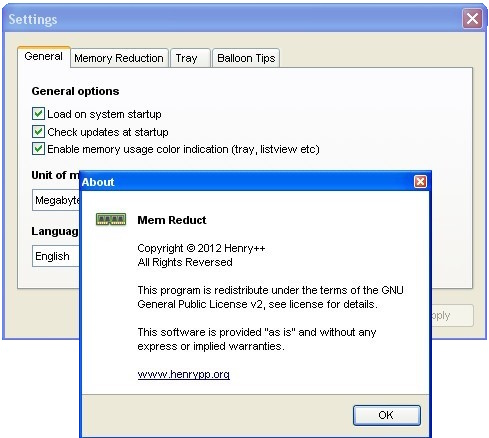
Understand cleanup settings
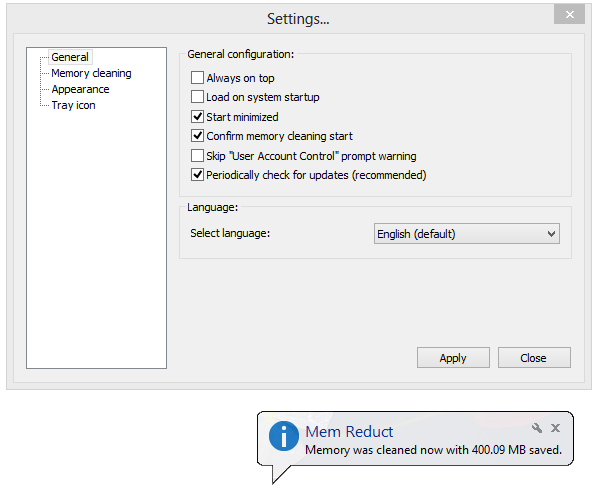
Automatic threshold and timed cleanup are different triggers. Frequent cleanup is not inherently better. Begin with a reproducible workload and change only one setting at a time so that you can tell which change caused a pause or improvement.
- Mem Reduct Settings: A Conservative Starting Point
- Configure Mem Reduct Threshold-Based Cleaning
- Set a Mem Reduct Cleaning Interval Carefully
- Mem Reduct Memory-Cleaning Areas Explained
Check your own before-and-after results
The local worksheet calculates memory and task-time changes from numbers you enter yourself. It does not read your computer, run a cleaner, or submit data. Repeat the same workload and keep notes about conditions; one reading is not a performance study.
Open the memory comparison worksheet · Browse all 54 guides
Questions and answers
What is Mem Reduct?
Mem Reduct is a Windows utility by Henry++ that reports memory use and can clear selected memory areas. It does not add physical RAM.
Is Mem Reduct free?
The project is distributed as free software under GPLv3. Verify the actual downloaded file and its source before running it.
Does clearing memory always make Windows faster?
No. Programs may need to load data back into RAM. Measure task time and responsiveness instead of judging only the memory percentage.
Which release is described here?
The product reference is version 3.5.2, published April 1, 2025. Release information was checked on October 31, 2026; development documentation can differ.
Where should I start if cleanup causes pauses?
Disable automatic cleanup, record the selected memory regions, and use the freezing guide to isolate one setting at a time.
Sources and evidence
Product statements use the tagged release documentation. Diagnostic steps are proposed checks, not claimed laboratory results.